
Account
Balance, transactions, income events and last update.
I designed Runway to connect account balance, upcoming commitments and the next income date, helping people understand what a payment changes before they make it.
Product thinking
Research synthesis
User journeys
Mobile UI
Interaction & prototyping
2026
BJAK
AI Neobank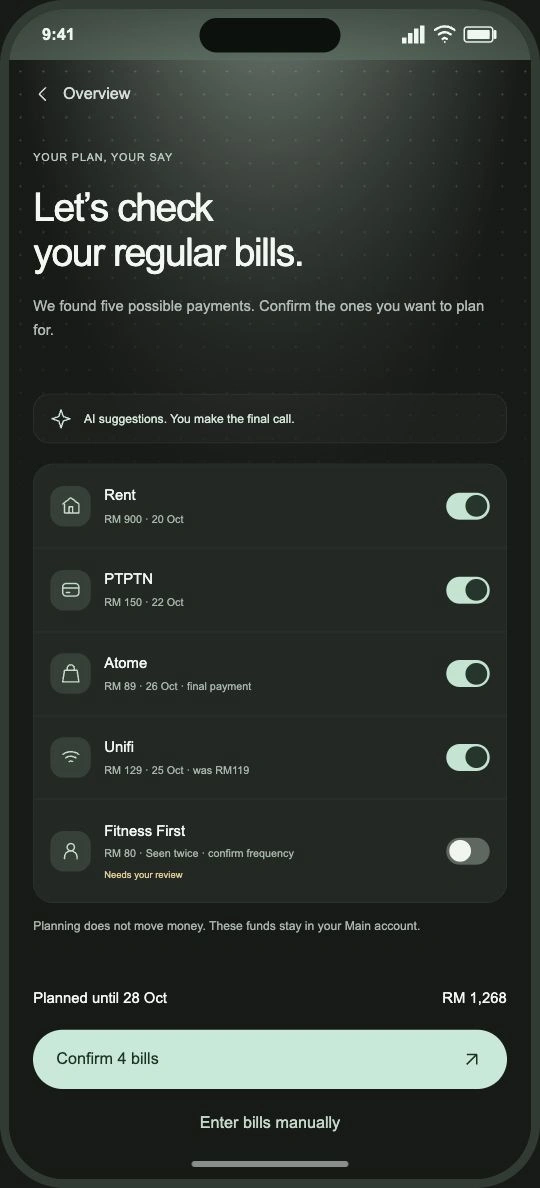
An account balance tells people what they have. It does not tell them how much is already needed for rent, bills and instalments before their next income arrives.
I focused Runway on one decision inside BJAK’s AI Neobank. What can I spend today without losing sight of the bills ahead? The experience connects that question to bill review, a payment preview and a clear way to adjust the plan.
Keep the decision small. Give people a useful daily amount without requiring them to build a category budget.
Make AI visible where it helps. Surface recurring payments and changes, with the evidence needed to correct them.
Keep approval with the person. Confirm a bill, choose a planning horizon and review a transfer before anything changes.
I reviewed the BJAK finance brief alongside the existing Runway flows and everyday money management tools. The brief calls for a focused mobile journey where AI creates a useful improvement in an ordinary financial decision.
From the broader scope of payments, savings and other financial services, I narrowed the work to the relationship between account balance, recurring obligations and the next income date.

PIDM’s financial planning tools treat recurring commitments as inputs. That supported keeping bills explicit, even when they belong to different spending categories.
Setting aside an amount in a plan and transferring it to another account are different actions. Runway keeps that distinction visible.
A repeated transaction is evidence of a pattern. It is not permission to treat it as a future bill. Uncertain suggestions start off.
The system has three layers: account data, a plan the user confirms and actions that change that plan. AI helps identify possible commitments and changes. The daily amount comes from a calculation that can be inspected.
I kept the estimate separate from the ledger. Reviewing bills changes the plan. A payment changes the balance. An approved pocket transfer changes where funds sit. Each event recalculates the same daily amount.
Balance, transactions, income events and last update.
Bills, due dates, confidence and the chosen time horizon.
Daily amount, payment impact and recovery choices.
The plan starts with RM1,820 in Main. Four confirmed bills total RM1,268, leaving RM552 for the 12 days until payday. A RM180 payment leaves RM372, bringing the daily amount to RM31. The calculation changes when its inputs change.
The journey follows one question: what can I spend while keeping the next bills in view? Each step gives the person enough information to make the next decision.
“Can I spend from this balance?”
Start with the money in Main and the date of the next income.
Balance and payday give the plan its starting point.
“What still needs to be paid?”
Review each suggested payment. Keep the real commitments and switch off anything that does not belong.
Four confirmed bills total RM1,268. Nothing has moved out of Main.
“What does that leave me each day?”
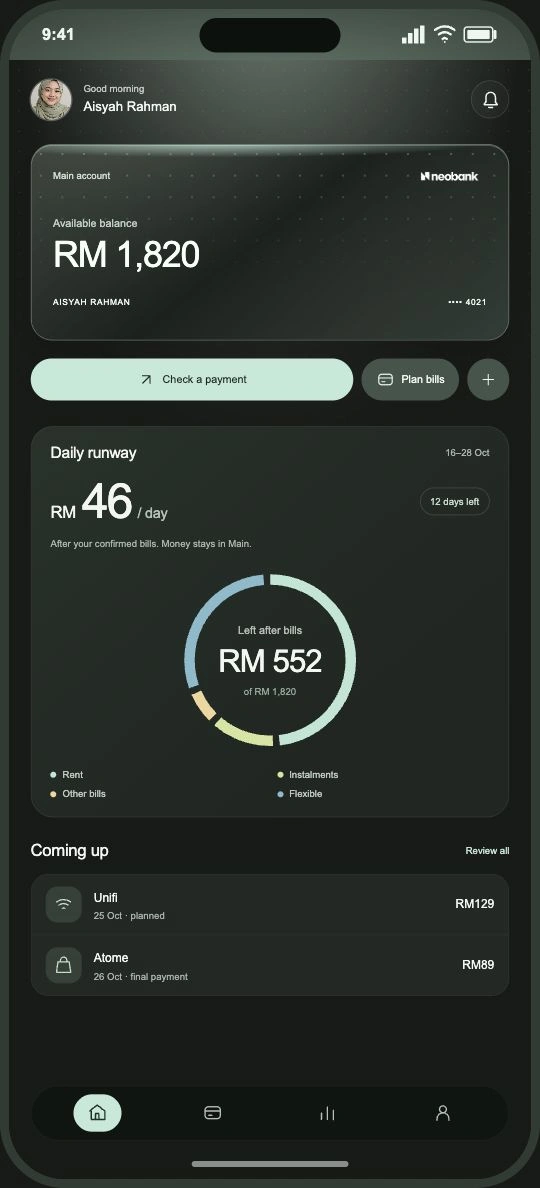
Read the daily amount alongside the bills and time remaining.
RM552 remains for 12 days: RM46 per day.
“What changes if I spend RM180?”
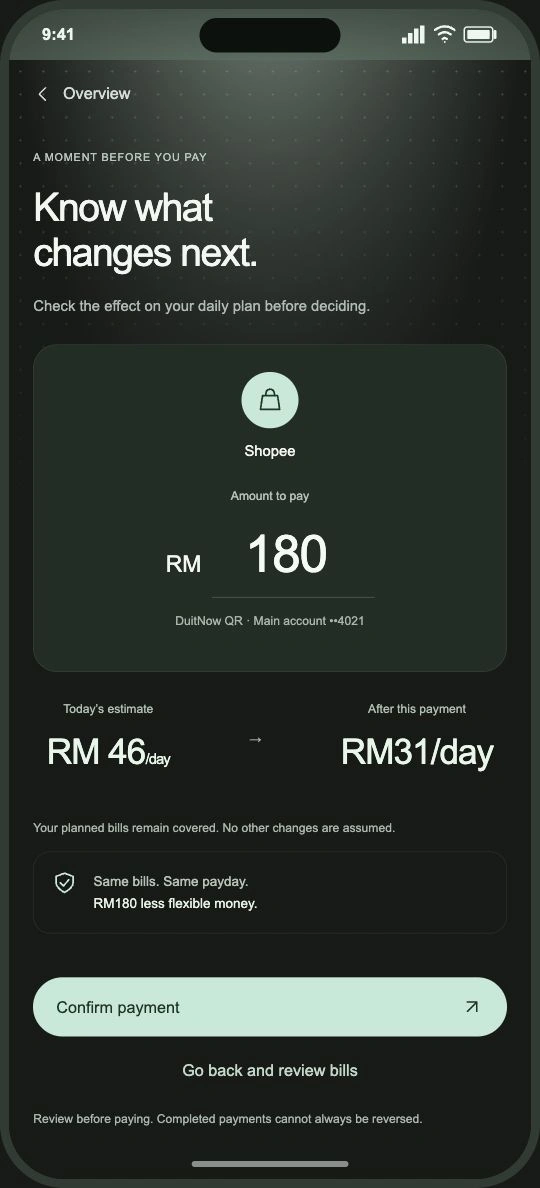
Compare the amount before and after the payment, then decide whether to proceed.
The daily amount changes from RM46 to RM31. The bills remain covered.
“Where do I stand now?”
After confirmation, the balance and daily amount update together.
The person returns to one current plan, with the change visible.
“Does this plan still fit?”
Check the new income, bill amounts and dates. Remove completed instalments before starting the next cycle.
A new cycle starts with reviewed commitments.
Go back to bill review, correct it and recalculate the daily amount.
Review a pocket transfer, reduce daily spending or set a reminder. A reminder does not resolve the missing money.
Choose a weekly plan using confirmed funds, then review it after seven days.
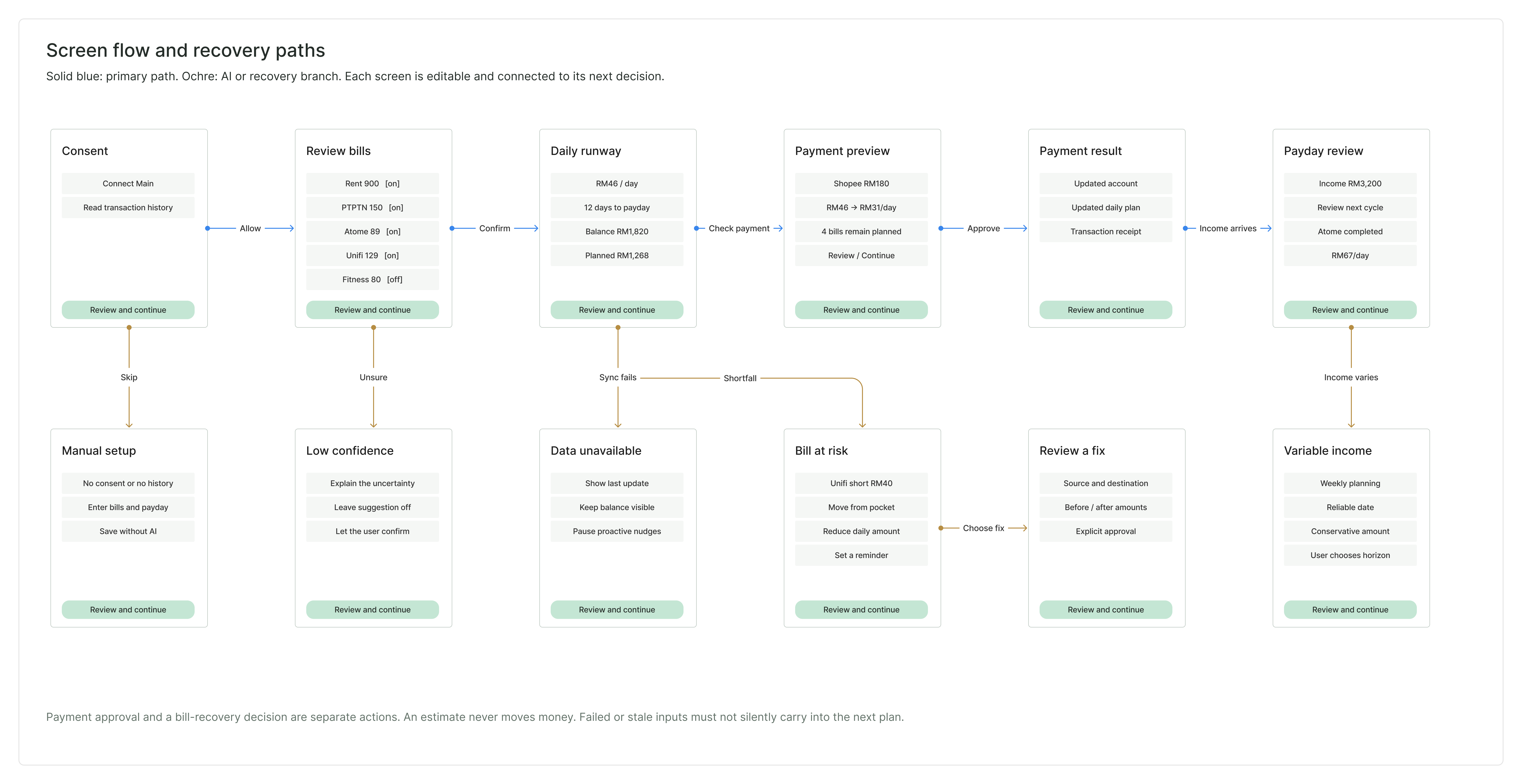
Before refining the visual design, I organised the information each state needs: the input, what the system knows, the decision to make and the next action.
The flow includes a manual route when someone skips account access, a correction route for uncertain bills and a safe return to the plan after a change. Payment approval and bill recovery remain separate decisions.
The interface uses charcoal surfaces, soft mint light and a restrained dotted texture. White type carries the main amounts. Mint marks the action, while amber is reserved for a situation that needs attention.
I kept the surrounding case study neutral so the product can be reviewed clearly. Each screen below has its explanation beside it, with annotations pointing to the decision it supports.
Confirm the inputs before trusting the estimate.
The amount, due date and reason for uncertainty sit beside each bill. The toggle changes the plan, with a running total before confirmation.
Low confidence suggestions start off. Turning one on requires an explicit choice.
A balance and a spending plan answer different questions.
The card keeps the account balance visible. The daily amount is separate, with the planning horizon and allocation immediately below.
The thin segmented ring shows where the balance is committed and what remains flexible.
Connect the payment to the days that follow.
The preview compares today’s amount with the amount after the payment. The bill plan and payday stay constant so the change is easy to explain.
The bill coverage message explains whether this payment leaves the planned bills covered before the person approves it.
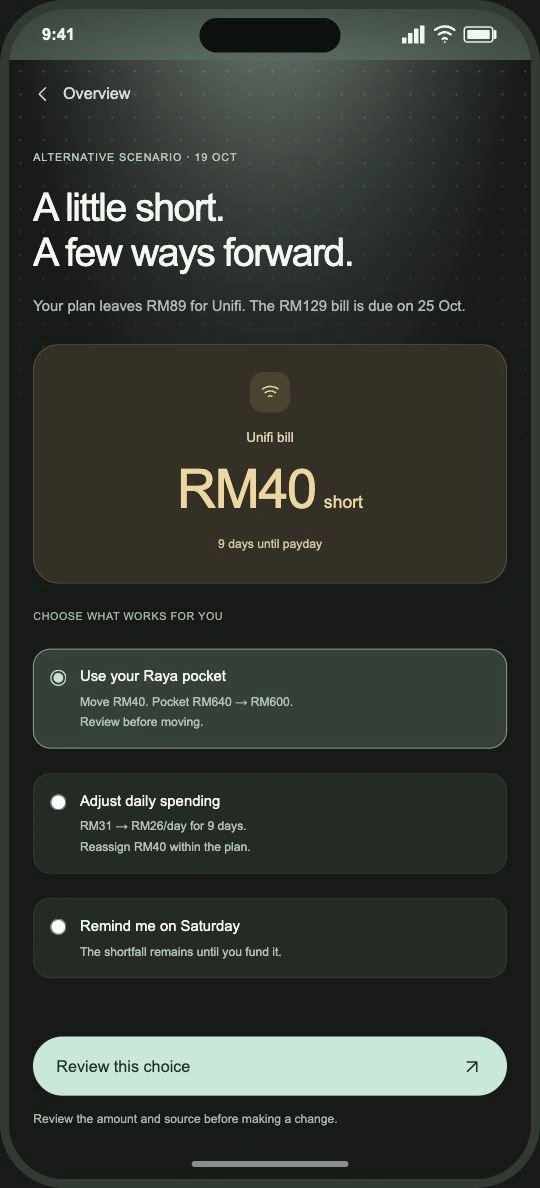
An alert needs a useful next step.
The bill, due date and missing amount appear together. A pocket move shows the source and the resulting balance before approval.
Reducing daily spending changes the plan. A reminder leaves the shortfall unresolved.
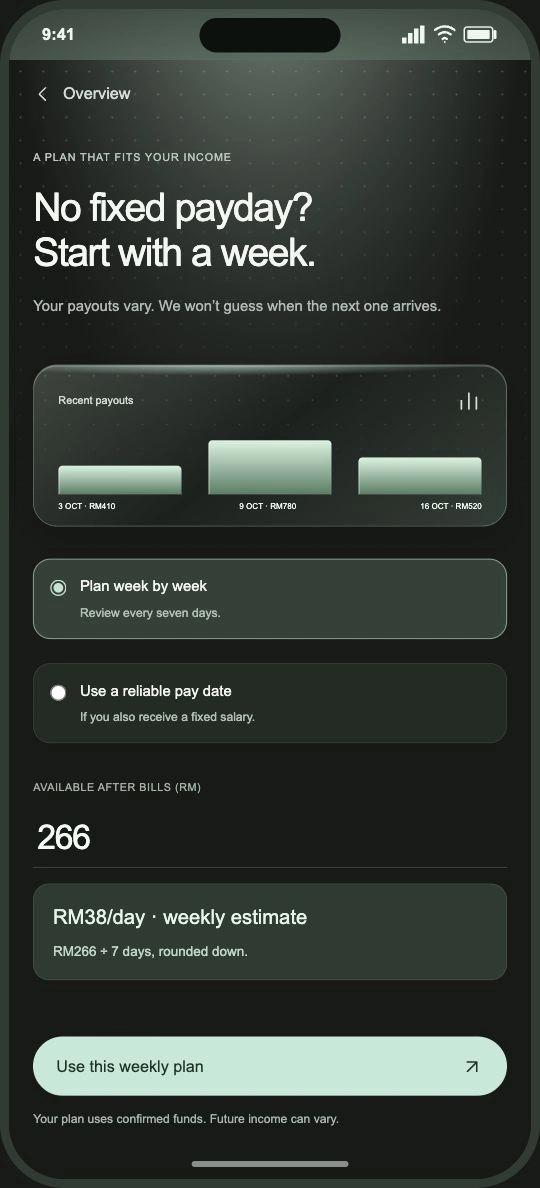
The system asks when income is uncertain.
Recent payouts explain why a payday cannot be inferred confidently. The person chooses a weekly plan or a reliable income date.
Future income is not counted as available money. The estimate uses funds already confirmed.
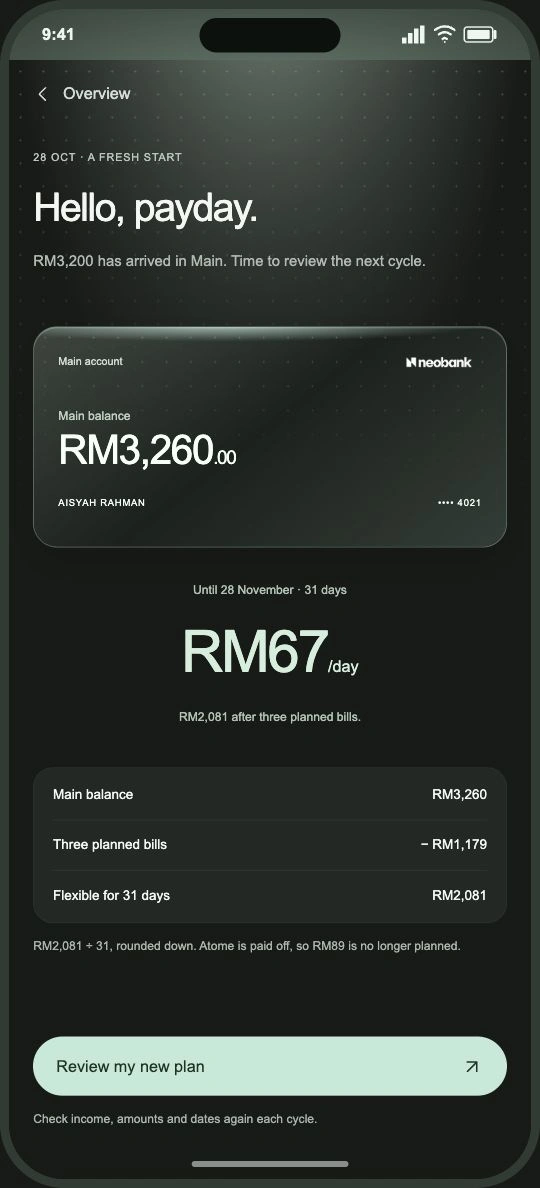
Carry learning forward without carrying old assumptions.
The next cycle starts with the incoming payment and a review of the remaining commitments. Completed instalments drop out of the plan.
Amounts, dates and changes remain reviewable before the person accepts the new cycle.
Follow bill review into the daily plan, preview a payment and see the updated estimate. The walkthrough loops through the connected flow.
I treated the calculation, the interaction and the language as one system. A correction must update every place that uses the same input. A recovery choice needs a review state. A data failure needs a useful fallback.
Confirmed commitments feed both the overview and the payment preview. The same bill amount appears in each state, and the daily amount rounds down.
Suggested, confirmed, changed and unavailable data have distinct meanings. The user can see which input needs attention and how to correct it.
Evaluate setup completion, bill corrections, payment overrides and funded bills. Pair those signals with whether people can explain the daily amount and its limits.
The next evaluation should cover the main task and the difficult cases, including a wrong recurring payment, a changed bill, repeated smaller purchases, an unavailable data connection and a variable pay schedule. The design should make those cases understandable without blocking the person’s choice.